 Stilos
Recipe keeper
Recipes that write your grocery list
Keep each recipe with its ingredients, steps, timings and photos. When you decide to cook it, Stilos turns the ingredients into a grocery list, already sorted by aisle.
Watch it happen
From ingredients to a sorted list
This is the idea in a few seconds: the ingredients of one recipe become a grocery list, grouped by store aisle.
A new grocery list made from the recipe: only its 7 ingredients, sorted into 7 aisles.
Lemon garlic pasta
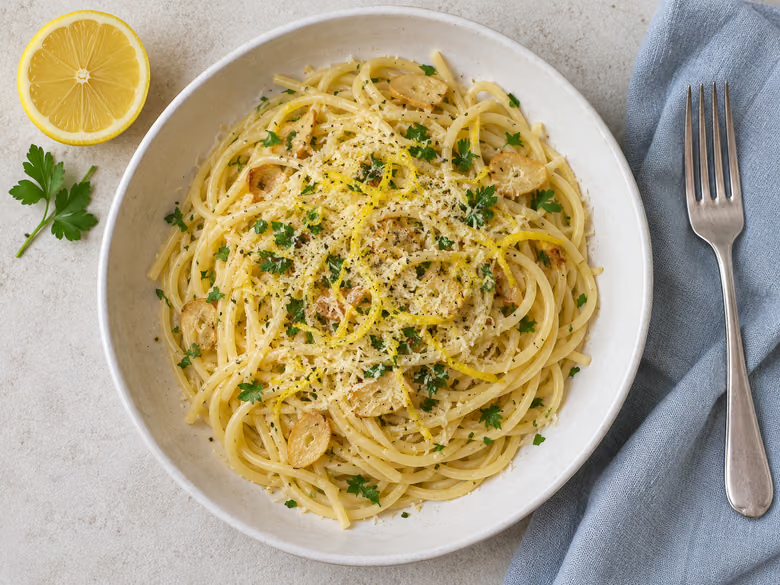
Ingredients
Instructions
- Boil the spaghetti in well-salted water until just tender. Keep a cup of the cooking water.
- Warm the olive oil and soften the sliced garlic over a low heat.
- Zest and juice the lemons into the pan, then toss in the pasta with a splash of the water.
Groceries - Lemon garlic pasta - Nov 12, 2026
Produce (3)
Fruit
- 2 lemons
Vegetables
- 4 cloves garlic
Fresh Herbs
- A handful of fresh parsley
Dairy, Eggs & Cold (1)
Cheese
- 60 g parmesan
Pantry & Dry Goods (3)
Spices & Seasonings
- Black pepper
Oils, Sauces & Condiments
- 3 tbsp olive oil
Grains & Pasta
- 400 g spaghetti
Make Grocery List
7 ingredients from “Lemon garlic pasta”.
- 400 g spaghetti
- 2 lemons
- 4 cloves garlic
- 60 g parmesan
- and 3 more
A looping demonstration of the Stilos screens. In the app it works on your own recipes.
Search
Find one recipe among hundreds
Type a few letters and the list narrows as you go. Search looks through titles, ingredients and steps, so "banana" finds the bread, the pancakes and anything else that uses one.
Today
Peanut butter cookies9:41 AM
Cream the butter and sugar until pale and fluffy.
Pumpkin bread8:15 AM
Preheat the oven and line a loaf tin with baking paper.
Yesterday
Penne arrabbiataYesterday
Bring a large pot of salted water to the boil.
Baba ganoushYesterday
Blend until smooth and taste for seasoning.
MinestroneYesterday
Simmer gently until everything is tender.
Earlier
Honey glazed carrotsNov 10
Season well and roast until golden.
Waldorf saladNov 9
Toss everything together just before serving.
Rice puddingNov 7
Chill for at least two hours before serving.
Banana muffinsNov 5
Mix the dry ingredients in one bowl and the wet in another.
Potato rostiNov 4
Heat the oil in a wide pan over a medium heat.
Cucumber saladNov 2
Toss everything together just before serving.
Beef stewOct 31
Simmer gently until everything is tender.
Soda breadOct 30
Preheat the oven and line a loaf tin with baking paper.
Chickpea curryOct 28
Soften the onion, then add the garlic and spices.
Jollof riceOct 26
Soften the onion, then add the garlic and spices.
Lemon drizzle loafOct 24
Preheat the oven and line a loaf tin with baking paper.
GazpachoOct 23
Simmer gently until everything is tender.
Pork tenderloinOct 21
Season well and roast until golden.
BrowniesOct 19
Cream the butter and sugar until pale and fluffy.
Sushi rollsOct 18
Layer the fillings and wrap tightly.
ColeslawOct 16
Toss everything together just before serving.
Chocolate chip cookiesOct 14
Cream the butter and sugar until pale and fluffy.
Garlic breadOct 13
Knead until the dough is smooth and springs back.
Chocolate banana breadOct 11
Preheat the oven and line a loaf tin with baking paper.
FlapjacksOct 9
Cream the butter and sugar until pale and fluffy.
Butter chickenOct 7
Soften the onion, then add the garlic and spices.
Lemon barsOct 6
Cream the butter and sugar until pale and fluffy.
Caprese saladOct 4
Toss everything together just before serving.
CalzoneOct 2
Layer the fillings and wrap tightly.
TrifleOct 1
Chill for at least two hours before serving.
Potato saladSep 29
Toss everything together just before serving.
Bean burritosSep 27
Layer the fillings and wrap tightly.
BagelsSep 26
Knead until the dough is smooth and springs back.
Club sandwichSep 24
Layer the fillings and wrap tightly.
Chicken shawarmaSep 22
Layer the fillings and wrap tightly.
Cinnamon rollsSep 20
Knead until the dough is smooth and springs back.
Chicken quesadillasSep 19
Layer the fillings and wrap tightly.
Tuna meltSep 17
Layer the fillings and wrap tightly.
Vegetable kormaSep 15
Soften the onion, then add the garlic and spices.
Sausage rigatoniSep 14
Bring a large pot of salted water to the boil.
Baked zitiSep 12
Bring a large pot of salted water to the boil.
Fish tacosSep 10
Layer the fillings and wrap tightly.
French toastSep 9
Whisk the eggs with a pinch of salt.
Mac and cheeseSep 7
Bring a large pot of salted water to the boil.
Dal tadkaSep 5
Soften the onion, then add the garlic and spices.
French onion soupSep 3
Simmer gently until everything is tender.
TiramisuSep 2
Chill for at least two hours before serving.
Greek saladAug 31
Toss everything together just before serving.
Stuffed mushroomsAug 29
Season well and roast until golden.
Couscous saladAug 28
Toss everything together just before serving.
Tomato salsaAug 26
Blend until smooth and taste for seasoning.
Baked potatoesAug 24
Season well and roast until golden.
Banh miAug 23
Layer the fillings and wrap tightly.
CheesecakeAug 21
Chill for at least two hours before serving.
Tomato soupAug 19
Simmer gently until everything is tender.
Falafel wrapsAug 17
Layer the fillings and wrap tightly.
Thai green curryAug 16
Soften the onion, then add the garlic and spices.
ShakshukaAug 14
Heat the oil in a wide pan over a medium heat.
Baked salmonAug 12
Season well and roast until golden.
HummusAug 11
Blend until smooth and taste for seasoning.
Clam chowderAug 9
Simmer gently until everything is tender.
Basil pestoAug 7
Blend until smooth and taste for seasoning.
Sugar cookiesAug 6
Cream the butter and sugar until pale and fluffy.
Banana breadAug 4
Preheat the oven and line a loaf tin with baking paper.
Beef and broccoliAug 2
Heat the oil in a wide pan over a medium heat.
Split pea soupJul 31
Simmer gently until everything is tender.
Banoffee pieJul 30
Chill for at least two hours before serving.
Marble cakeJul 28
Preheat the oven and line a loaf tin with baking paper.
Stuffed peppersJul 26
Season well and roast until golden.
Beef chiliJul 25
Soften the onion, then add the garlic and spices.
Chicken stir-fryJul 23
Heat the oil in a wide pan over a medium heat.
HollandaiseJul 21
Blend until smooth and taste for seasoning.
Egg saladJul 20
Whisk the eggs with a pinch of salt.
Butternut squash soupJul 18
Simmer gently until everything is tender.
ShortbreadJul 16
Cream the butter and sugar until pale and fluffy.
Pita breadJul 14
Knead until the dough is smooth and springs back.
Sheet-pan sausagesJul 13
Season well and roast until golden.
Breakfast sandwichJul 11
Layer the fillings and wrap tightly.
TabboulehJul 9
Toss everything together just before serving.
Tuna pasta bakeJul 8
Bring a large pot of salted water to the boil.
RatatouilleJul 6
Heat the oil in a wide pan over a medium heat.
Zucchini breadJul 4
Preheat the oven and line a loaf tin with baking paper.
Roasted cauliflowerJul 3
Season well and roast until golden.
Pasta puttanescaJul 1
Bring a large pot of salted water to the boil.
Thai beef saladJun 29
Toss everything together just before serving.
Sourdough loafJun 27
Knead until the dough is smooth and springs back.
Green smoothieJun 26
Blend until smooth and taste for seasoning.
EmpanadasJun 24
Layer the fillings and wrap tightly.
CarbonaraJun 22
Bring a large pot of salted water to the boil.
Gingerbread loafJun 21
Preheat the oven and line a loaf tin with baking paper.
Quinoa saladJun 19
Toss everything together just before serving.
Veggie burgersJun 17
Layer the fillings and wrap tightly.
PhoJun 16
Simmer gently until everything is tender.
Sweet and sour porkJun 14
Heat the oil in a wide pan over a medium heat.
Ice cream sandwichesJun 12
Chill for at least two hours before serving.
GuacamoleJun 10
Blend until smooth and taste for seasoning.
Date and walnut loafJun 9
Preheat the oven and line a loaf tin with baking paper.
Mushroom risottoJun 7
Heat the oil in a wide pan over a medium heat.
Berry smoothieJun 5
Blend until smooth and taste for seasoning.
BriocheJun 4
Knead until the dough is smooth and springs back.
Spring rollsJun 2
Layer the fillings and wrap tightly.
Pasta primaveraMay 31
Bring a large pot of salted water to the boil.
Ramen brothMay 30
Simmer gently until everything is tender.
Egg drop soupMay 28
Whisk the eggs with a pinch of salt.
Cacio e pepeMay 26
Bring a large pot of salted water to the boil.
MeatloafMay 24
Season well and roast until golden.
TzatzikiMay 23
Blend until smooth and taste for seasoning.
Black bean chiliMay 21
Soften the onion, then add the garlic and spices.
Lamb rogan joshMay 19
Soften the onion, then add the garlic and spices.
Barbecue ribsMay 18
Season well and roast until golden.
Bean saladMay 16
Toss everything together just before serving.
Lentil soupMay 14
Simmer gently until everything is tender.
CornbreadMay 13
Preheat the oven and line a loaf tin with baking paper.
Chicken gyrosMay 11
Layer the fillings and wrap tightly.
PretzelsMay 9
Knead until the dough is smooth and springs back.
Chocolate chip muffinsMay 7
Mix the dry ingredients in one bowl and the wet in another.
LasagnaMay 6
Bring a large pot of salted water to the boil.
Roast potatoesMay 4
Season well and roast until golden.
CrepesMay 2
Mix the dry ingredients in one bowl and the wet in another.
Fried riceMay 1
Heat the oil in a wide pan over a medium heat.
Chicken tikka masalaApr 29
Soften the onion, then add the garlic and spices.
Chocolate mousseApr 27
Chill for at least two hours before serving.
Grilled cheeseApr 26
Layer the fillings and wrap tightly.
Katsu curryApr 24
Soften the onion, then add the garlic and spices.
Lemon possetApr 22
Chill for at least two hours before serving.
Barbecue sauceApr 20
Blend until smooth and taste for seasoning.
Lobster rollsApr 19
Layer the fillings and wrap tightly.
Irish stewApr 17
Simmer gently until everything is tender.
Pizza doughApr 15
Knead until the dough is smooth and springs back.
Flour tortillasApr 14
Knead until the dough is smooth and springs back.
Apple cinnamon muffinsApr 12
Mix the dry ingredients in one bowl and the wet in another.
Egg fried noodlesApr 10
Heat the oil in a wide pan over a medium heat.
Panna cottaApr 9
Chill for at least two hours before serving.
Huevos rancherosApr 7
Heat the oil in a wide pan over a medium heat.
Chana masalaApr 5
Soften the onion, then add the garlic and spices.
Miso soupApr 3
Simmer gently until everything is tender.
Cobb saladApr 2
Toss everything together just before serving.
Nicoise saladMar 31
Toss everything together just before serving.
Chicken noodle soupMar 29
Simmer gently until everything is tender.
Turkey meatballsMar 28
Season well and roast until golden.
Dinner rollsMar 26
Knead until the dough is smooth and springs back.
FocacciaMar 24
Knead until the dough is smooth and springs back.
Pad thaiMar 23
Heat the oil in a wide pan over a medium heat.
Peanut sauceMar 21
Blend until smooth and taste for seasoning.
Bechamel sauceMar 19
Blend until smooth and taste for seasoning.
Bran muffinsMar 17
Mix the dry ingredients in one bowl and the wet in another.
Spanish omeletteMar 16
Whisk the eggs with a pinch of salt.
Sloppy joesMar 14
Layer the fillings and wrap tightly.
Roast chickenMar 12
Season well and roast until golden.
Gnocchi with sage butterMar 11
Bring a large pot of salted water to the boil.
Key lime pieMar 9
Chill for at least two hours before serving.
Yorkshire puddingsMar 7
Whisk the eggs with a pinch of salt.
Oatmeal raisin cookiesMar 6
Cream the butter and sugar until pale and fluffy.
Mushroom tagliatelleMar 4
Bring a large pot of salted water to the boil.
FrittataMar 2
Whisk the eggs with a pinch of salt.
Beef rendangFeb 28
Soften the onion, then add the garlic and spices.
Breakfast burritosFeb 27
Whisk the eggs with a pinch of salt.
BlondiesFeb 25
Cream the butter and sugar until pale and fluffy.
ChallahFeb 23
Knead until the dough is smooth and springs back.
Spaghetti bologneseFeb 22
Bring a large pot of salted water to the boil.
Pulled pork slidersFeb 20
Layer the fillings and wrap tightly.
Massaman curryFeb 18
Soften the onion, then add the garlic and spices.
Ginger biscuitsFeb 17
Cream the butter and sugar until pale and fluffy.
Quiche lorraineFeb 15
Whisk the eggs with a pinch of salt.
Coffee and walnut cakeFeb 13
Preheat the oven and line a loaf tin with baking paper.
Chicken fajitasFeb 11
Heat the oil in a wide pan over a medium heat.
Egg rollsFeb 10
Layer the fillings and wrap tightly.
Lettuce wrapsFeb 8
Layer the fillings and wrap tightly.
ChimichurriFeb 6
Blend until smooth and taste for seasoning.
Custard tartFeb 5
Whisk the eggs with a pinch of salt.
Beef tacosFeb 3
Layer the fillings and wrap tightly.
BLTFeb 1
Layer the fillings and wrap tightly.
Overnight oatsJan 31
Chill for at least two hours before serving.
Chia puddingJan 29
Chill for at least two hours before serving.
PaellaJan 27
Heat the oil in a wide pan over a medium heat.
SnickerdoodlesJan 25
Cream the butter and sugar until pale and fluffy.
Eggs benedictJan 24
Whisk the eggs with a pinch of salt.
Buttermilk pancakesJan 22
Mix the dry ingredients in one bowl and the wet in another.
Chicken thighs with lemonJan 20
Season well and roast until golden.
Scrambled eggsJan 19
Whisk the eggs with a pinch of salt.
Cheese sconesJan 17
Mix the dry ingredients in one bowl and the wet in another.
Garlic prawnsJan 15
Heat the oil in a wide pan over a medium heat.
Belgian wafflesJan 14
Mix the dry ingredients in one bowl and the wet in another.
Baked codJan 12
Season well and roast until golden.
Caesar saladJan 10
Toss everything together just before serving.
SconesJan 8
Mix the dry ingredients in one bowl and the wet in another.
Carrot cakeJan 7
Preheat the oven and line a loaf tin with baking paper.
Vegetable chow meinJan 5
Heat the oil in a wide pan over a medium heat.
NaanJan 3
Knead until the dough is smooth and springs back.
Blueberry muffinsJan 2
Mix the dry ingredients in one bowl and the wet in another.
Cheese souffleDec 31
Whisk the eggs with a pinch of salt.
BorschtDec 29
Simmer gently until everything is tender.
Banana oat cookiesDec 28
Cream the butter and sugar until pale and fluffy.
CiabattaDec 26
Knead until the dough is smooth and springs back.
Oat pancakesDec 24
Mix the dry ingredients in one bowl and the wet in another.
Banana pancakesDec 22
Mix the dry ingredients in one bowl and the wet in another.
Salsa verdeDec 21
Blend until smooth and taste for seasoning.
Roast lambDec 19
Season well and roast until golden.
Basil pesto pastaDec 17
Bring a large pot of salted water to the boil.
Leek and potato soupDec 16
Simmer gently until everything is tender.
No notes found
Nothing matches “”.
200 sample recipes. Type in the search box to try it.
A recipe page laid out for cooking
A recipe in Stilos is a note with a shape. The details sit at the top, the ingredients are a checklist, and the method is a numbered list you can follow with a spoon in one hand.
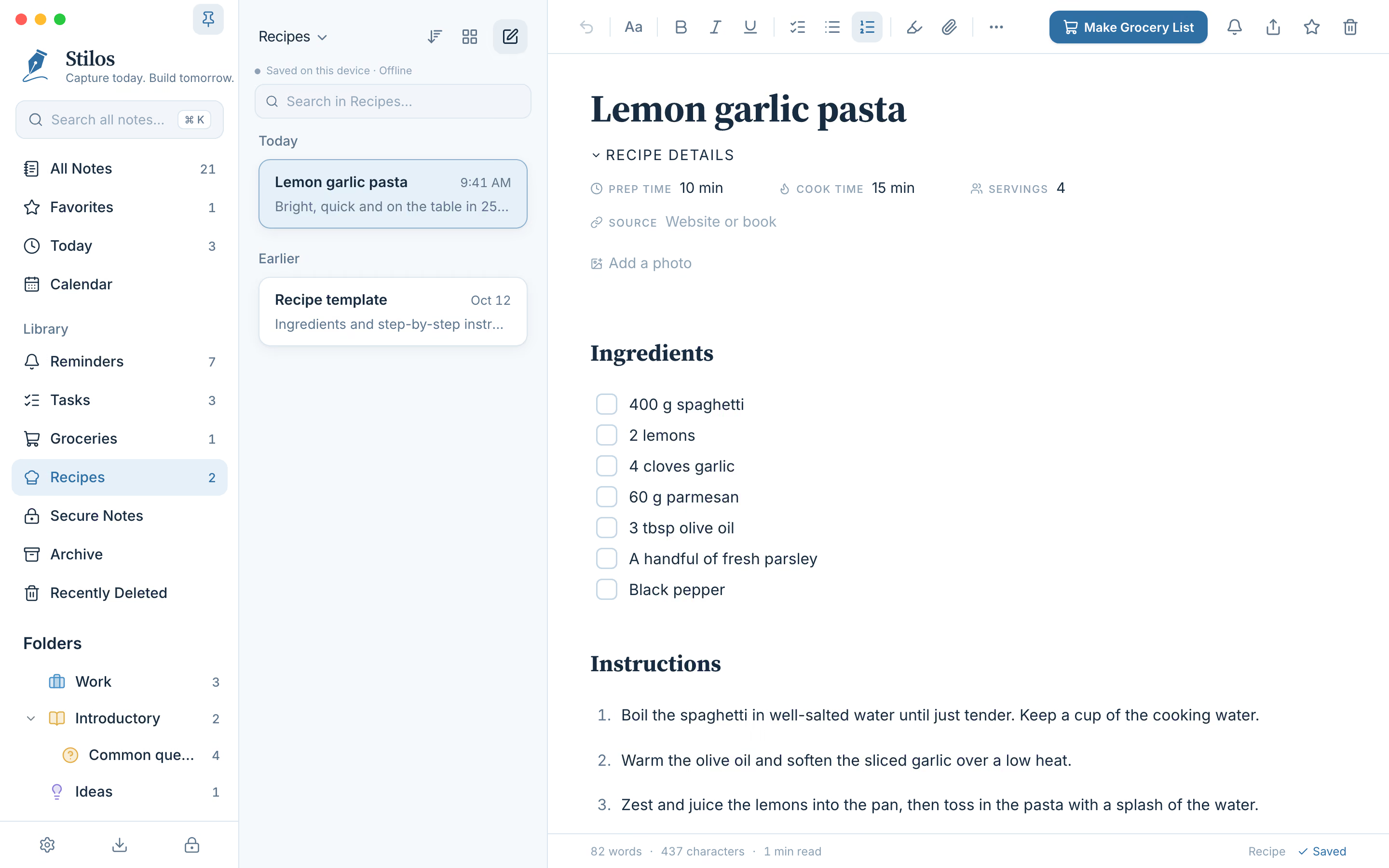
A recipe on a computer. The Make Grocery List button sits at the top right.
The recipe page
What a recipe holds
- The details. Preparation time, cooking time, number of servings, and where the recipe came from, such as a website or a book.
- Photos. Add up to eight photos to a recipe, so you remember what the finished dish should look like.
- Ingredients you can tick. Each ingredient has a box. Tick them as you gather them on the counter.
- Steps in order. The method is a numbered list, and you can add headings, notes and tips around it like in any other note.
Recipes are gathered in their own Recipes view, and search looks through titles, ingredients, steps and details. Type "lemon" and every recipe that uses one turns up. You can also file recipes in folders and mark the ones you cook most as favorites.
Like everything else in Stilos, recipes are stored on your own device. There is no account, and the collection is not shared with anyone. See how Stilos keeps notes private.
How it works
From recipe to grocery list
- Open the recipe. Check the ingredients are listed under the Ingredients heading. That list is what Stilos reads.
- Press Make Grocery List. A small window shows how many ingredients were found and the first few of them.
- Choose where they go. Create a new grocery list named after the recipe, or add the ingredients to a list you already have. Adding to an existing list skips anything already on it.
- Press Make list. The grocery list opens with the ingredients grouped by store aisle, ready for the store.
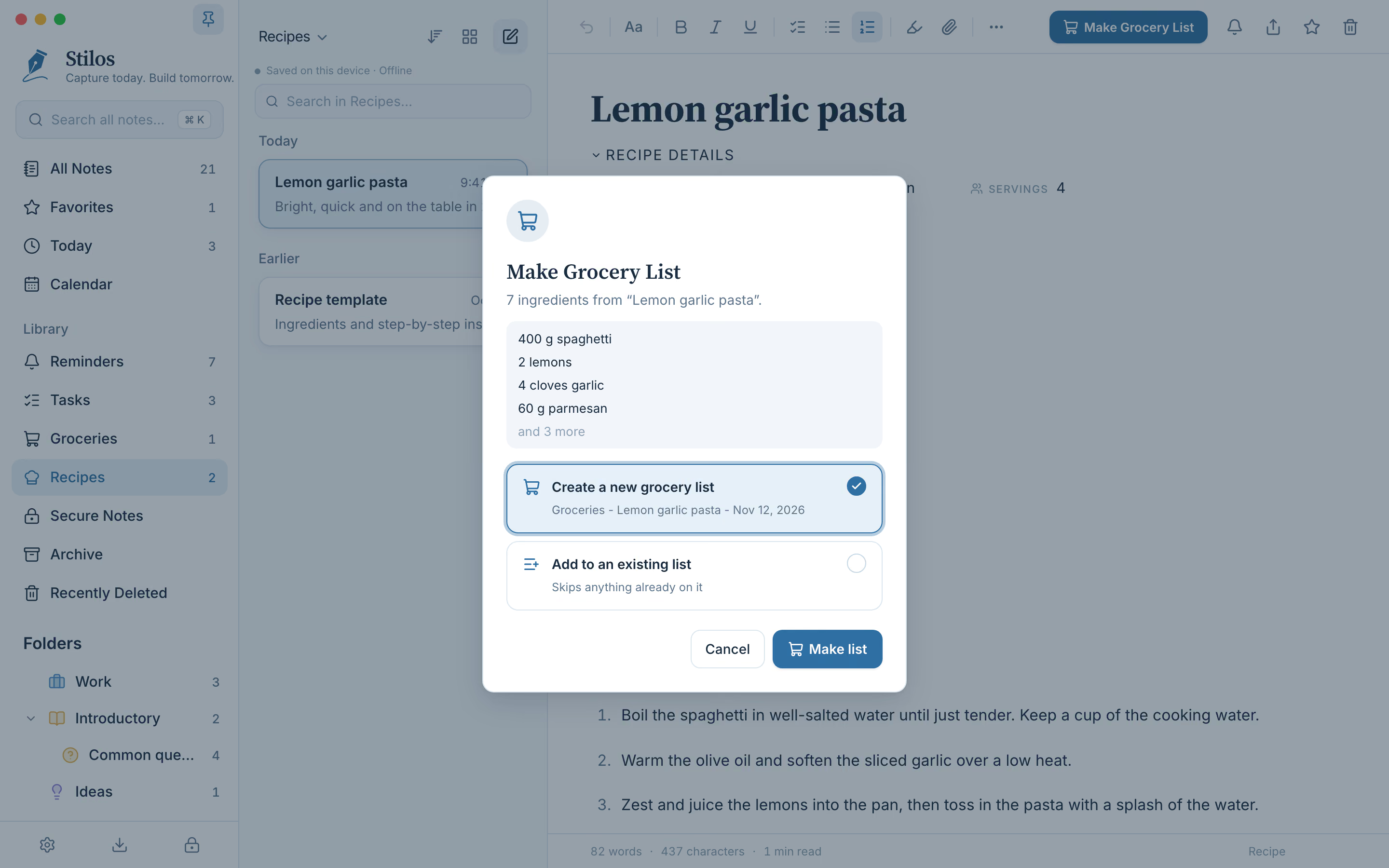
Seven ingredients found, with a choice of a new list or an existing one.
One list for the whole week
The second choice in that window is the useful one when you plan several meals. Start a grocery list for the week, then open each recipe in turn and add its ingredients to the same list. Anything already on the list is skipped, so three recipes that all need olive oil leave you with one line for olive oil, not three.
The list that comes out is an ordinary grocery list. Add the things no recipe mentions, such as milk or dish soap, and press Organize again to file them in the right aisle. Amounts stay on each line as you wrote them: "400 g spaghetti" is still "400 g spaghetti" on the list.
Two limits to know
Stilos does not fetch recipes from websites. You type a recipe or paste its text, and the source field records where it came from. It also does not add amounts together: if you add the same recipe to a list twice, the second pass is skipped, not doubled.
Good to know
Questions about this
Can Stilos turn a recipe into a grocery list?
Yes. Open a recipe and press Make Grocery List. Stilos reads the ingredients, then either creates a new grocery list or adds them to one you already have. The list comes out grouped by store aisle.
Can I import a recipe from a website?
No. Stilos does not connect to websites, so you type the recipe or paste its text into a recipe note. The source field is there to record the website or book it came from.
Can I add photos to a recipe?
Yes. A recipe can hold up to eight photos. They are stored on your device with the recipe and are included when you save a backup.
Will it combine ingredients from several recipes?
It adds them to the same list and skips anything that is already there, so nothing is listed twice. It does not add amounts together, so check the quantities when two recipes share an ingredient.
More in Stilos
The rest of the app
Grocery lists sorted by aisle
Type or paste a list in any order. One press groups it by store aisle, on your device.
How Organize works →Private notes, no account
Notes stay on your own device. Add a password, and a second lock for the most private ones.
How Stilos keeps notes private →To-do lists and reminders
Tick things off, set a reminder on any note, and see every unfinished task in one view.
How tasks and reminders work →A calendar for your notes
See reminders and the notes you worked on, by week or by month.
How the calendar works →Free today
Keep the recipes you actually cook
Stilos is free and asks for no account. If there is something a recipe page should do for you that it does not, tell us about it.